
Google Forms is free forever with no response cap. SurveyMonkey's free plan stops you at 10 questions and 40 responses per survey, then charges $46-$139/user/month once you need branching logic or real analytics. That's the entire decision in one sentence — the rest is figuring out which limit actually bites for your team.
Founders often default to Google Forms because it's already sitting in their Workspace account, then hit a wall the first time they need skip logic for a 40-question onboarding survey or want to compare NPS trend lines across three quarters. Neither tool is wrong — they're built for different jobs.
SurveyMonkey vs Google Forms: The Side-by-Side Comparison
The surveymonkey vs google forms decision comes down to price, response limits, branching logic, and how much analytics you actually need. Here's the direct comparison across nine attributes.
| Attribute | SurveyMonkey | Google Forms |
|---|---|---|
| Starting price | $0 (capped) then $46/mo annual | $0 forever, no cap |
| Free-plan response limit | 40 responses / 10 questions per survey | Unlimited |
| Top-tier list price (non-Enterprise) | $139/mo (Premier, annual) | N/A — no form-feature tier |
| Paid Workspace add-on | N/A | ~$7/user/mo (storage/admin only, no new form features) |
| Team plan minimum | 3 seats, annual billing only | Any Workspace seat count |
| Response overage fee | $0.15 per response over annual limit | None |
| Branching / skip logic | Full skip logic, question piping, display logic | Section-based branching only |
| Analytics | Cross-tabulation, trend analysis, text analysis | Basic charts + Google Sheets export |
| 2026 AI features | Not separately published as a headline feature | Gemini response summaries, theme analysis (paid Workspace only) |
Figures are 2026 estimates blended from SurveyMonkey's and Google's published pricing pages, Featurebase, SurveySparrow, and Survicate pricing guides. Team-tier ranges reflect blended vendor-reported figures, not a single published list price.
SurveyMonkey vs Google Workspace: Entry Paid Tier Pricing
Company pricing pages, annual billing, August 2026
Data
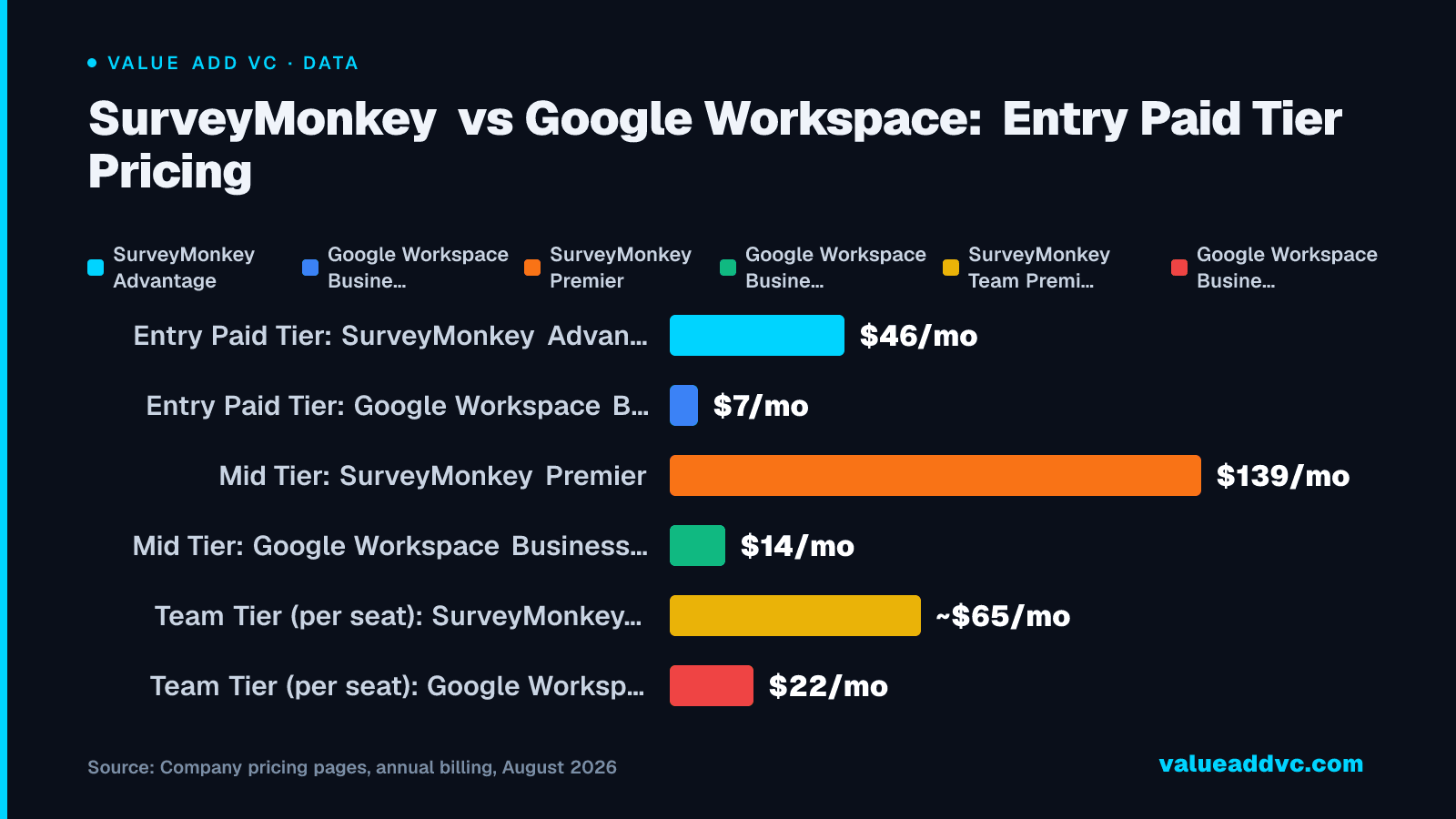
Google's paid Workspace tiers don't unlock extra Forms features — the price difference buys storage and admin controls, not survey logic.
How SurveyMonkey Pricing Actually Works
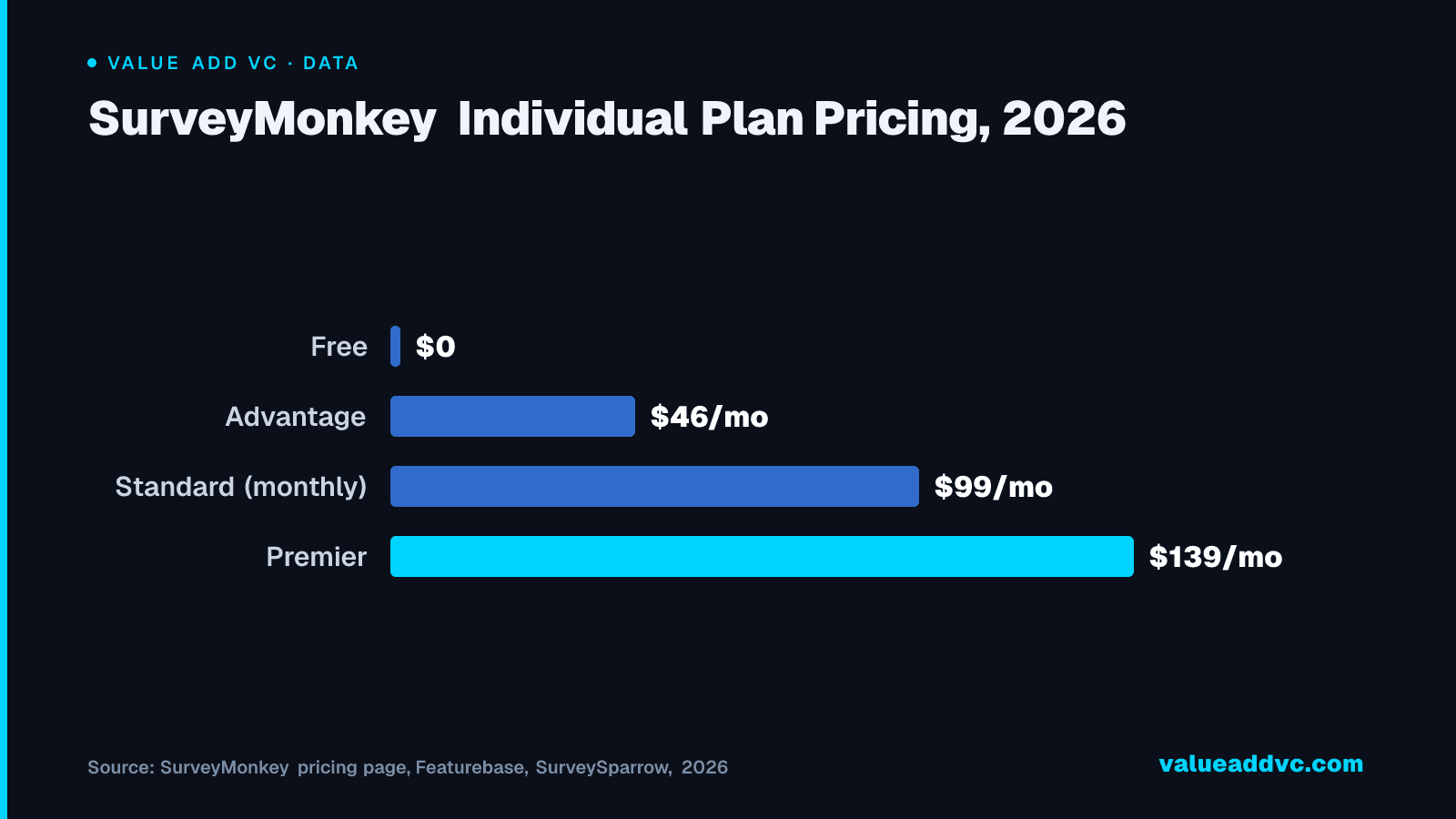
SurveyMonkey sells a Free plan capped at 10 questions and 40 responses per survey, with SurveyMonkey branding stamped on every page, per Featurebase's 2026 pricing breakdown. Paid individual plans are Advantage ($46/user/month billed annually, $552/year) and Premier ($139/user/month billed annually) — a standalone monthly-only Standard plan also exists at $99/month with no annual discount. Team plans (Team Advantage and Team Premier) require a minimum of three seats, are billed annually only, and run roughly $25-$35/user/month and $55-$75/user/month respectively. Every paid plan carries a fixed annual response limit, and going over it costs $0.15 per additional response, billed automatically.
That last part is the one founders miss. A team that budgets for the $46/month Advantage seat and then runs a viral NPS campaign can rack up hundreds of dollars in overage fees in a single billing cycle — the sticker price is the floor, not the ceiling.
SurveyMonkey Individual Plan Pricing, 2026
Skipping annual billing roughly doubles the entry price — Standard runs $99/month with no discount available, versus $46/month for Advantage paid annually.
SurveyMonkey pricing page, Featurebase, SurveySparrow, 2026
Data
| Item | Value |
|---|---|
| Free | $0 |
| Advantage | $46/mo |
| Standard (monthly) | $99/mo |
| Premier | $139/mo |
Where Google Forms Actually Wins
Google Forms has the exact same form-building features on a free personal account as it does on a paid Google Workspace plan — upgrading buys Drive storage and admin controls, not extra survey capability. There's no premium tier gating question count, response volume, or number of forms, and every submission syncs directly into a Google Sheet without an export step. For teams running recurring internal polls, see our guide on running employee surveys.
In 2026, Google layered Gemini AI into Forms — proactive response summaries and theme-percentage analysis of open-text answers, per Lark Suite's Forms pricing breakdown — but those specific features require a paid Workspace seat rather than a free consumer account, narrowing the analytics gap with SurveyMonkey without fully closing it.
The tradeoff: Forms' conditional logic only branches at the section level, there's no payment collection or e-signature support, no duplicate-submission prevention, and the design templates read as generic rather than on-brand. For a quick internal poll or a one-time applicant intake form, none of that matters. For a customer-facing NPS program, it starts to.
Where SurveyMonkey Actually Wins
SurveyMonkey's branching engine supports full skip logic, question piping, and display logic — not just section jumps — which matters the moment a survey needs to route respondents down genuinely different paths based on earlier answers. Its analytics suite adds cross-tabulation, trend analysis across survey waves, and text analysis on open-ended responses, none of which Google Forms offers natively.
According to Survicate's 2026 comparison, that analytics depth is the single biggest reason growth and product teams stick with SurveyMonkey once they outgrow a spreadsheet — the tool is doing the trend math a founder would otherwise build by hand in Sheets.
Integrations and Data Ownership
Google Forms writes every response straight into a Google Sheet you already own, in real time, with zero setup — that's the single biggest operational advantage it has over any paid survey tool. There's no export step, no API key, and no risk of losing historical response data if you ever cancel a subscription, because there's nothing to cancel. The tradeoff is that Sheets becomes your database, dashboard, and archive all at once, so any downstream automation (routing a response to Slack, triggering a follow-up email) has to be built with Apps Script or a third-party connector like Zapier rather than a native workflow builder.
SurveyMonkey ships native integrations with Salesforce, HubSpot, Slack, Mailchimp, and Tableau on its paid tiers, plus a REST API for teams building custom pipelines. That matters for a startup already running its CRM and support stack through Salesforce or HubSpot — SurveyMonkey responses can attach to a contact record automatically, where a Google Forms response sits in a spreadsheet until someone manually reconciles it. The flip side: canceling a SurveyMonkey plan doesn't delete historical data outright, but advanced export formats and API access disappear with the subscription, so response history becomes harder to pull in bulk once you're back on the free tier.
What the free-plan comparison misses
"Google Forms is free and SurveyMonkey isn't" oversimplifies it. SurveyMonkey's free tier is genuinely usable for a single small survey — 40 responses covers most early customer-discovery calls-to-action — and its paid tiers include support and deliverability tooling that a self-serve Google account doesn't. Conversely, "Google Forms has no limits" is true for form-building but not for analysis: once you need trend lines across quarters, you're building that infrastructure yourself in Sheets, which has its own hidden time cost that doesn't show up in a pricing comparison.
SurveyMonkey vs Google Forms: Which Should Your Startup Use?
Under 40 responses and no branching needed — internal polls, one-off event feedback, a quick applicant screener — Google Forms is the right call. It's free, unlimited, and already inside every founder's Google account.
Running a recurring NPS or customer-satisfaction program, need conditional logic across a 30+ question survey, or want trend analysis without building it in Sheets — pay for SurveyMonkey Advantage at $46/user/month. Track your team's NPS math with our NPS formula guide once you're collecting responses on a schedule.
Heavy international or high-volume research teams that will blow past response caps regularly should budget for SurveyMonkey Premier or Team Premier up front — the $0.15-per-response overage fee adds up faster than the plan price suggests once a survey goes viral internally.
Google Forms is the free tool for a single survey. SurveyMonkey is the paid tool for a survey program. Most startups need the free one first and only pay once they're running the same survey every quarter.
Track startup tooling decisions and fundraising benchmarks at Value Add VC. Originally published in the Trace Cohen newsletter.
Latest from the Pulse
Get VC data most people never see
— free to subscribe
Trace's notes on venture, AI and startups, a few times a week. Join 5,000+ subscribers. No spam.
No spam, unsubscribe anytime. Sent via Substack · Privacy · or subscribe on Substack ↗